Suspect Workflow
Last updated: December 29, 2025
In Flow, the Suspect Workflow ensures that changes to requirements do not silently invalidate dependent work. When a requirement is modified, Flow can automatically flag any linked requirements as Suspect, prompting their owners to review and assess downstream impact.
This workflow helps teams proactively manage dependencies, maintain alignment, and prevent unintended requirement drift.
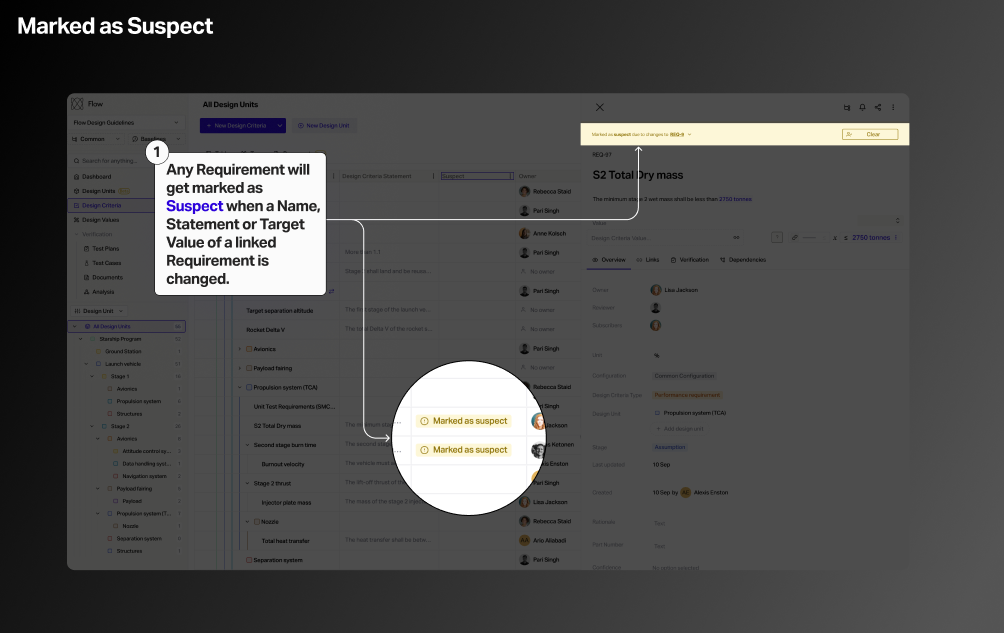
To enable the automatic 'Mark as Suspect' workflow follow the step below:
1) Navigate to Project Settings
2) Toggle the Enable Suspects slider
3) Configure which changes trigger the suspect flag
The video below demonstrates the Suspect Workflow in action, showing how Flow automatically detects downstream dependencies when a requirement changes. Notifications are emailed to the appropriate owners so that teams review and resolve suspect items.